
The short answer
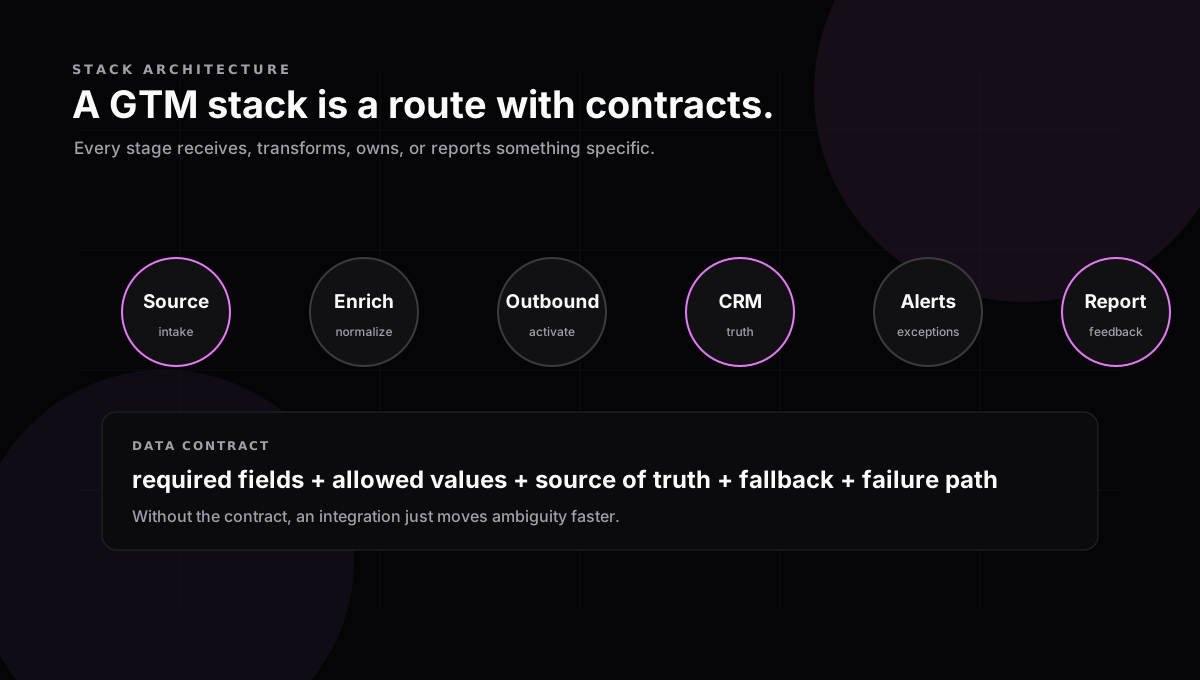
A GTM tech stack architecture is the map of how records, fields, events, and ownership move between GTM tools. It is not a list of software. The architecture is the agreement about what moves, when it moves, which system is allowed to be true, and what happens when the route breaks.
Most teams describe their GTM stack as a collection of tools: Apollo, Clay, Smartlead, HubSpot, Slack, Sheets. That inventory is useful, but it is not architecture. Architecture begins when you can explain the route: where a lead enters, how it becomes usable, how activity becomes CRM truth, who gets alerted, and how performance is read later.
ZoomInfo’s guidance gets the order right: start with GTM goals and KPIs, define data requirements, then design integrations and governance. The important implication is that a tool belongs in the stack only if it has a job in the route. If it cannot name what it receives, transforms, owns, or reports, it is probably adding another handoff without reducing work.
The six-stage reference architecture
For outbound-heavy B2B teams, the most useful reference model is a six-stage route. It is deliberately plain: source, enrichment, outbound, CRM, alerts, reporting. Each stage has one job and one contract with the next stage.
Source
Create the candidate record and capture why it exists.
Contract: source, segment, ICP reason, owner, rejected reason
Enrichment
Normalize account and contact fields before activation.
Contract: company domain, role, verified email, account fit, confidence
Outbound
Activate the record and classify the response.
Contract: campaign, send status, reply type, bounce reason, opt-out
CRM
Hold the operating truth for owner, stage, source, and next action.
Contract: owner, lifecycle stage, task, attribution, last activity
Alerts
Interrupt only when a human needs to act or a sync breaks.
Contract: event type, account context, owner, severity, SLA
Reporting
Explain source quality, reply outcomes, follow-up, and gaps.
Contract: accepted leads, enriched coverage, replies, conversion, exceptions
The data contract is the architecture
The most common stack mistake is treating integrations as plumbing. “Clay syncs to HubSpot” is not a design. Which fields sync? Who can overwrite them? What happens when enrichment confidence is low? Which status changes create a task? Which source value survives into reporting? Those are architectural decisions.
A field contract should be small enough to enforce. For each handoff, write the required fields, allowed values, source of truth, fallback, owner, and failure path. The goal is not a perfect data dictionary. The goal is to prevent the downstream tool from guessing what the upstream tool meant.
- Required fields: the record cannot move without them.
- Allowed values: statuses, sources, reply types, and stages use a controlled list.
- Source of truth: one tool wins for each field, and everyone knows which one.
- Fallback: low-confidence enrichment or missing fields have a written path.
- Failure path: bad records stop, alert, or route to cleanup instead of drifting forward.
Choose the sync pattern by the job
Not every movement deserves the same integration pattern. A one-time account backfill can be a controlled import. A positive reply needs an event. Weekly performance may belong in a dashboard. The practical choice is the lowest-complexity sync that preserves the route’s contract.
CSV import
Use: One-time loads, backfills, and low-frequency list movement.
Watch: Easy to duplicate records and lose source context unless the import contract is strict.
Native sync
Use: Standard CRM, sequencer, and enrichment connections that do not need custom logic.
Watch: Field behavior is often hidden behind settings, so ownership still needs documentation.
Webhook or API event
Use: Reply routing, bounce handling, task creation, and exception alerts that must happen quickly.
Watch: Fast errors spread fast; failures need retry rules and visible alerts.
Warehouse or reverse ETL
Use: Cross-system reporting, audience building, and lifecycle history at larger scale.
Watch: Great for feedback loops, but too heavy for teams that have not defined basic CRM truth.
The three rules that keep the stack from drifting
First, define one system of record per field. A CRM is usually the operating truth for owner, lifecycle, account, and opportunity state. Enrichment tools can be the truth for research fields until accepted. Sequencers can be the truth for send and reply events until those events are written back.
Second, route exceptions as deliberately as successes. A bounced email, missing domain, duplicate account, API failure, or unmapped reply is not noise. It is where the route is telling you the system needs attention. The alert should include the record, the failed rule, the owner, and the next action.
Third, review the route, not just the tools. Salesforce found that nearly 70% of sales reps feel overwhelmed by tool volume and that most organizations intend to consolidate. Consolidation helps only when it removes handoffs or clarifies ownership. Replacing one tool with another while keeping the same undefined route just moves the break.
Where to start
Start by drawing the current route as it actually works. Pick one lead and trace it from source to report. Mark each field that appears, changes, or disappears. Then write the smallest contract that would have made that lead easy to follow. That is the basis of the GTM workflow audit, and it is the safest way to improve architecture without buying software first.
Sources
- ZoomInfo — GTM tech stack essentials
- Salesforce — sales productivity research and State of Sales
- HubSpot — What is a go-to-market strategy?
- Clay — GTM engineering: what it is and how to hire
Get the next field note
One practical, sourced note on GTM handoffs and GTM engineering when it's published.
No list-blasting. A short, useful sequence — unsubscribe any time.