

The short answer
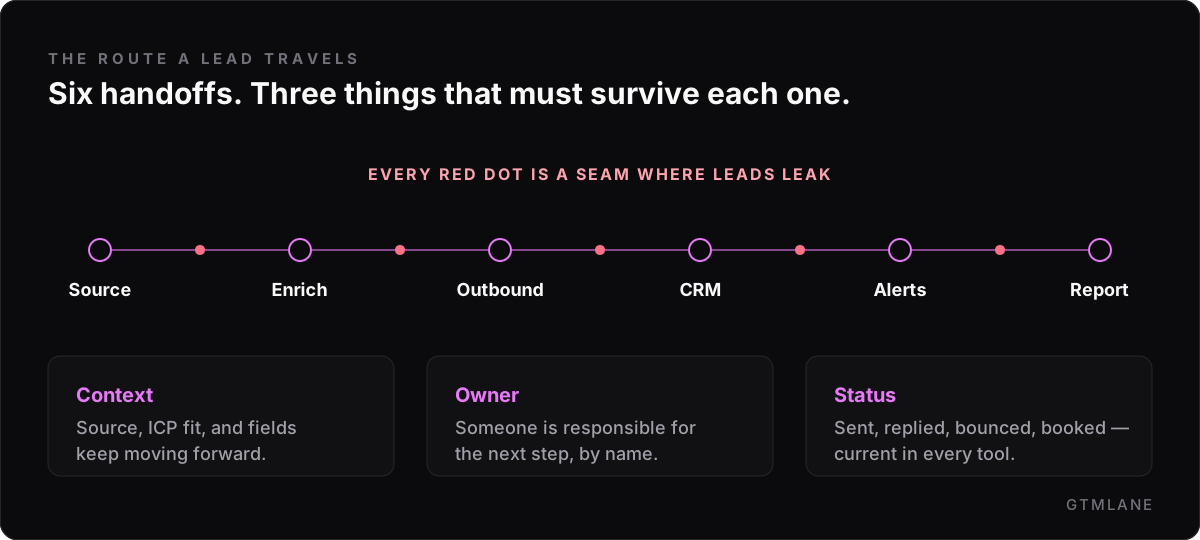
GTM pipelines leak at six handoffs: lead source to enrichment, enrichment to outbound, outbound to CRM, inside the CRM, alerts, and CRM to reporting. At each seam a lead can lose its context, its owner, or its status — and the fix is a written rule per seam, not a new tool.
Most teams don’t have a pipeline problem. They have a handoff problem.
Add a sourcing tool, an enrichment tool, a sequencer, a CRM, a Slack channel, a reporting sheet — each one works on its own. The trouble lives in the seams between them, where a lead is supposed to move from one system to the next carrying its context, its owner, and its status. That’s where things fall on the floor: the reply nobody routed, the field that meant one thing in Clay and another in HubSpot, the report rebuilt from screenshots because no single tool held the truth.
Here is the route a lead actually travels — and the six places it leaks.
01 Lead context gets lost
Source → Enrichment
The symptom. Leads arrive from Apollo exports, scraped lists, inbound forms, and partner sheets — each with different fields, source labels, and owners. By the time a record reaches enrichment, half of that context is already gone.
Why it leaks. Nothing forces a lead to carry the same shape before it moves on. “Source” is free text on one list and missing on another; ICP fit lives in someone's head.
The fix. Decide the contract before enrichment runs: every accepted lead carries a source label, an ICP flag, an owner, and a rejection path for the ones that don't qualify. Weak records get turned away at the door instead of three steps later.
02 Fields drift from what outreach needs
Enrichment → Outbound
The symptom. Clay builds beautiful tables, but the columns drift from what the sequencer, the CRM, and the report actually need. Personalization quietly breaks on the records missing a field.
Why it leaks. Enrichment is built for coverage, not for the systems downstream. Fallbacks get improvised per campaign and never written down.
The fix. Map each enrichment output to where it's used — outreach copy, CRM field, reporting column — with explicit fallback rules and a confidence threshold. The same field then means the same thing everywhere.
03 Reply state gets stuck in the tool
Outbound → CRM
The symptom. Instantly or Smartlead know exactly what was sent, bounced, opened, and replied to — but that status stays locked inside campaign views. The CRM finds out late, if at all.
Why it leaks. A reply isn't a reply. It's positive, an objection, a bounce, a referral, or an out-of-office — and each one needs a different next step and owner.
The fix. Route send status, reply type, bounce reason, and next action to the right owner and system as it happens, not at the weekly review. Follow-up stops waiting on manual interpretation.
04 The record stops being trustworthy
Inside the CRM
The symptom. HubSpot, Pipedrive, or Close fills with partial records, duplicated companies, and stages that don't match what outbound is actually doing.
Why it leaks. Several tools write to the same fields with no agreement on which one wins, so the “truth” depends on who touched the record last.
The fix. Name a system of record for each field, set dedupe rules, and define what each stage means and who moves it. Attribution stops being a guess.
05 Urgent events wait in a tab
Alerts
The symptom. A positive reply, a sync failure, a missing enrichment field, a blocked send — all of it depends on a person remembering to check the right tab at the right time.
Why it leaks. “Important” is never defined, so every event is either noise or invisible until someone goes looking.
The fix. Decide which events are urgent, route them to the owner with the account context attached, and keep the rest out of the way. The team sees the work that needs action the day it happens.
06 The weekly view gets rebuilt by hand
CRM → Reporting
The symptom. Every Monday starts by reassembling the report from exports, screenshots, campaign memory, and whatever the CRM happened to capture.
Why it leaks. Source quality, send status, and CRM stage live in three different places, so the weekly number has to be reconstructed instead of read.
The fix. Define the reporting fields in the CRM, sync once, and build a single operating view of source quality, reply outcomes, follow-up, and gaps. The review starts from signal, not cleanup.
Handoff problem, or tooling problem?
A quick test: if you swapped a tool tomorrow, would the problem move with you? If replies still wouldn’t route, fields still wouldn’t agree, and the report still had to be rebuilt — it is the handoffs, not the tools. New software rarely fixes a seam; it just adds another one to maintain.
If you want a faster read on your own stack, run the two-minute Handoff Health Check and see which of the six are leaking.
Where to start
You don’t fix six handoffs at once. Start by following a single lead from source to reporting and marking every place it loses context, an owner, or its status. That map is the whole job in miniature — and it is exactly what a workflow audit produces. You can see an example audit to know what that looks like, or read how the cleanup sprint turns the map into fixes.
Map your route
Find the handoff that’s turning outbound into manual cleanup.
Get the next field note
One practical note on GTM handoffs when it's published. No volume, no fluff.
No list-blasting. A short, useful sequence — unsubscribe any time.